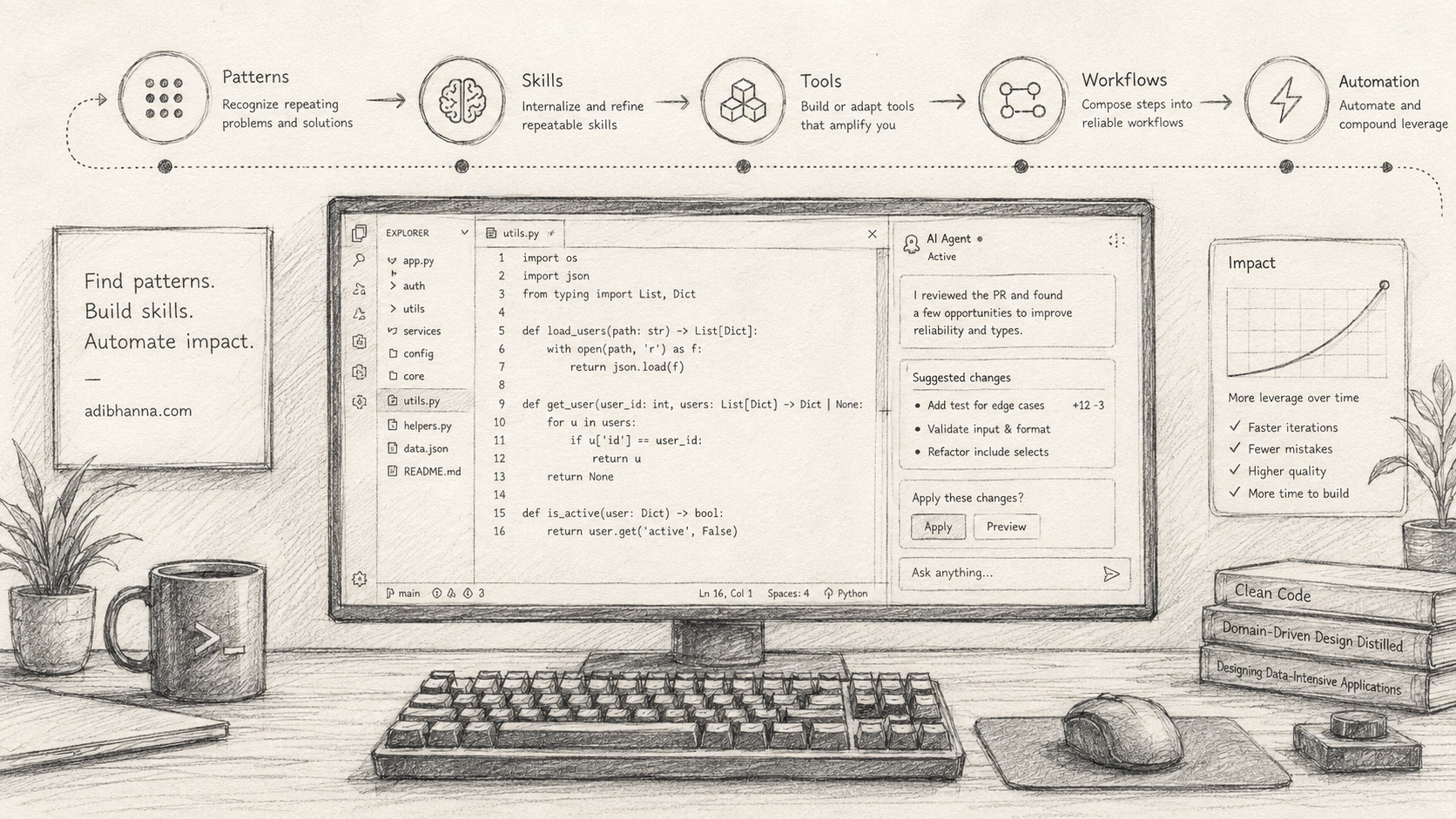
I spend a lot of time coding with AI agents.
And one of the biggest improvements to my workflow didn't come from finding a better model, writing a magical system prompt, or adding another MCP server.
It came from noticing patterns.
When you work with AI agents long enough, you start realizing that you're constantly asking them to do the same kinds of things.
You say things like:
Look at how we implemented this in the other service.
Or:
Run the tests, fix the failures, then run the linter.
Or:
Before implementing this, inspect the existing architecture and write a plan.
Or:
Make sure this follows our repository conventions.
At some point I realized:
Why am I explaining this every single time?
If I have to repeatedly teach an agent how I want something done, that isn't really an AI problem anymore.
It's an automation problem.
The AI Coding Loop
My workflow with AI agents has slowly evolved into something like this:
The interesting part is that the agent is not the only thing learning.
I'm learning how I want the agent to work.
That's an important distinction.
When something goes wrong, I don't just fix the output anymore.
I ask:
Is this something I'm going to have to correct again?
Your Corrections Are Data
Imagine an agent adds a new API endpoint.
The code works, but it doesn't follow the structure you normally use.
So you tell it:
We don't put business logic inside handlers. Handlers validate input, call the service layer, and translate the result into the API response.
The agent fixes it.
Problem solved.
Except three days later you ask it to build another endpoint.
And it does the same thing.
You correct it again.
Then again.
At this point the problem isn't that the AI made a mistake.
The problem is that you've discovered a recurring engineering rule and haven't encoded it anywhere.
That correction is valuable information.
And encoding it is embarrassingly cheap. It can be one paragraph in an instruction file:
## API endpoints

Handlers validate input, call the service layer, and map
the result to a response. No business logic in handlers.

Reference: internal/api/handlers/export_invoices.go
## API endpoints
Handlers validate input, call the service layer, and map
the result to a response. No business logic in handlers.
Reference: internal/api/handlers/export_invoices.goTwo minutes of work.
Now every future session starts already knowing this, and you stop having that conversation.
I think about it almost like training data for my development environment.
Over time, your development environment starts accumulating knowledge about how you build software.
And that's where things get interesting.
From Prompts to Skills
A lot of people use AI coding tools like this:
That's useful.
But I think the more powerful version looks more like this:
The agent is no longer starting from zero every time.
It operates inside a system you've built around it.
That system might contain:
- repository instructions
- architecture documentation
- reusable skills
- scripts
- CLI tools
- test commands
- validation workflows
- examples of good implementations
- code-generation helpers
- specialized subagents
- CI checks
The goal is to slowly move knowledge out of your head and into the environment.
What Is a Skill?
I use the word skill pretty loosely.
A skill is basically a reusable procedure that teaches the agent how to perform a specific type of work.
For example:
/create-api-endpoint/create-api-endpointcould tell the agent:
- Inspect similar endpoints.
- Identify the domain/service layer involved.
- Define the request and response types.
- Add validation.
- Implement the handler.
- Add service logic.
- Write unit tests.
- Write integration tests.
- Run the relevant test suite.
- Run the linter.
- Summarize the implementation.
Now instead of writing a giant prompt every time, I can say:
Use /create-api-endpoint to add an endpoint for exporting invoices.Use /create-api-endpoint to add an endpoint for exporting invoices.The prompt becomes tiny because the process lives somewhere else.
That's the important part.
Skills Should Capture Process, Not Just Prompts
One mistake I think people make is building giant prompt libraries.
Something like:
You are an expert senior software engineer...

Always write high quality code...

Make sure everything is tested...
You are an expert senior software engineer...
Always write high quality code...
Make sure everything is tested...That doesn't help much.
A good skill should describe an actual workflow.
For example:
# Implement Feature

## 1. Understand

- Read the issue.
- Inspect related code.
- Find at least two similar implementations.
- Identify affected packages.

## 2. Plan

Write a short implementation plan.

Do not modify code yet.

## 3. Implement

Follow existing architecture.

Prefer extending existing abstractions over creating new ones.

## 4. Validate

Run:

- unit tests
- integration tests
- static analysis
- formatter

## 5. Review

Inspect the diff.

Look specifically for:

- unnecessary abstractions
- duplicated logic
- missing error handling
- missing tests
- unrelated changes

## 6. Report

Summarize:

- what changed
- architectural decisions
- tests executed
- anything needing human review
# Implement Feature
## 1. Understand
- Read the issue.
- Inspect related code.
- Find at least two similar implementations.
- Identify affected packages.
## 2. Plan
Write a short implementation plan.
Do not modify code yet.
## 3. Implement
Follow existing architecture.
Prefer extending existing abstractions over creating new ones.
## 4. Validate
Run:
- unit tests
- integration tests
- static analysis
- formatter
## 5. Review
Inspect the diff.
Look specifically for:
- unnecessary abstractions
- duplicated logic
- missing error handling
- missing tests
- unrelated changes
## 6. Report
Summarize:
- what changed
- architectural decisions
- tests executed
- anything needing human reviewThat's not really a prompt.
It's closer to an engineering SOP for an AI agent.
And those are incredibly powerful.
Where This Stuff Actually Lives
None of this requires special infrastructure.
It's mostly markdown files in conventional locations:
- Repo-wide rules go in an instruction file the agent always reads:
CLAUDE.md,AGENTS.md,.cursor/rules— whatever your tools pick up. - Reusable procedures become skills or slash commands:
.claude/skills/,.claude/commands/. - Deterministic steps become plain scripts in
scripts/, and the skills point at them. - Specialized subagents get their own definitions, with narrower context and tools.
Most of it lives in the repository, next to the code it describes, and ships to every teammate — human or agent — through git.
The exact filenames matter less than the habit:
Knowledge moves out of chat history and into files the agent reads every session.
Find the Repeated Parts of Your Workflow
I don't think you should sit down one weekend and try to design 100 skills.
Start coding.
Then pay attention.
Every time you type something into an AI agent, ask yourself:
Have I said this before?
If the answer keeps becoming yes, you've probably found a skill.
Some obvious examples:
I tend to look for patterns around things like:
- implementing features
- debugging
- creating database migrations
- adding API endpoints
- writing tests
- reviewing a diff
- refactoring
- updating dependencies
- preparing pull requests
- debugging CI
- writing documentation
- investigating production issues
But some of the best skills are specific to the codebase.
For example:
/create-event-consumer/create-event-consumermight only make sense inside one project.
That's completely fine.
In fact, those are sometimes the most valuable skills because they encode knowledge that would normally require understanding hundreds of files.
Give the Agent Examples
Rules are useful.
Examples are often better.
Instead of telling an agent:
Follow our normal repository pattern.
Point it somewhere.
## Reference implementations

Before implementing a new consumer, inspect:

- internal/events/user_created.go
- internal/events/payment_completed.go

New consumers should follow the same lifecycle,
logging, retry, and error-handling patterns.
## Reference implementations
Before implementing a new consumer, inspect:
- internal/events/user_created.go
- internal/events/payment_completed.go
New consumers should follow the same lifecycle,
logging, retry, and error-handling patterns.Now the agent has something concrete to imitate.
I try to avoid explaining code conventions in English when the repository already contains a good example.
Good code is documentation for the agent.
Turn Repetition Into Scripts
Not everything should be a skill.
Sometimes the correct solution is just a script.
Suppose you're constantly asking the agent:
Find all modified Go packages and run tests for them.Find all modified Go packages and run tests for them.You could keep asking the agent to figure this out.
Or you could write:
./scripts/test-changed-packages./scripts/test-changed-packagesNow the skill simply says:
After modifying Go code, run:

./scripts/test-changed-packages
After modifying Go code, run:
./scripts/test-changed-packagesThis is much better.
Why?
Because natural language is probabilistic.
Scripts are deterministic.
I want the AI handling the things that require reasoning.
I want normal software handling everything else.
The Agent Should Use Tools, Not Reimplement Them
This changed how I think about developer tooling in general.
Whenever I'm evaluating a service now, one of the first things I care about is:
Can my agents control it?
Ideally there is a CLI.
A good CLI essentially becomes an API for the coding agent.
Instead of:
Go to the deployment dashboard and check why staging failed.
I want:
deployments logs staging --latestdeployments logs staging --latestAnd the agent can investigate it itself.
This is one of the reasons I think CLI-first developer tooling is becoming increasingly important.
The user of your CLI isn't necessarily a human anymore.
It might be an agent.
Skills Can Call Skills
This is where the workflow starts becoming much more powerful.
Imagine you have:
/implement-feature
/run-tests
/review-code
/fix-ci
/create-pr
/implement-feature
/run-tests
/review-code
/fix-ci
/create-prEventually you can create something higher level:
/ship-feature/ship-featurethat orchestrates everything.
Now we're moving from individual prompts to workflow composition.
This is where AI coding starts feeling dramatically different.
You're not asking the agent to write some code.
You're giving it an engineering process.
Then Automate the Workflow
Once something becomes predictable enough, I look for opportunities to automate it completely.
For example:
I wouldn't automate all of this immediately.
You earn automation.
First, do the task manually with the agent.
Then create a skill.
Then improve the skill.
Then make the validation reliable.
And only after the process becomes predictable do you automate the entire thing.
I think this progression is really important.
If you automate too early, you just automate mistakes.
Build Guardrails Before Increasing Autonomy
There's another side to this.
As agents become more autonomous, validation becomes more important.
If an agent is going to run for 30 minutes without me watching it, I need ways for the environment to tell it when it's wrong.
That means investing heavily in guardrails:
More autonomy requires better guardrails.
Those guardrails might be:
- strong type systems
- good tests
- linters
- formatters
- static analysis
- schema validation
- architectural boundaries
- CI
- security scanning
- deterministic scripts
I trust an agent much more in a Go project with good tests, clear interfaces, static analysis, and strong CI than in a giant loosely structured codebase with almost no automated validation.
Not necessarily because the model is better.
Because the environment makes failure obvious.
Use Humans for Judgment
My goal isn't to remove myself from software development.
It's almost the opposite.
I want to remove myself from the repetitive parts so I can spend more time on things that actually require judgment.
I don't want to spend my time telling an AI agent for the 40th time:
Run the formatter.
A computer should figure that out.
I want to think about:
- architecture
- product decisions
- tradeoffs
- abstractions
- interfaces
- performance
- developer experience
- whether we're solving the right problem
The agent can do an enormous amount of implementation work.
But I'm still responsible for deciding what good looks like.
Build Your Own Coding System
I think this is where AI-assisted programming is heading.
A lot of developers are currently comparing:
Claude Code vs Codex vs Cursor vs whatever comes next.
I think models will continue getting better.
But eventually the bigger competitive advantage will be the system you build around the model.
Two developers could use the exact same model and get completely different results.
That second developer has effectively built their own software-engineering operating system.
And it gets better every time they work.
My Rule: Never Make the Same Correction Forever
The simple rule I've started following is:
Whenever I repeatedly correct an AI agent, I try to turn that correction into a permanent improvement to the system.
Sometimes that's one sentence in an instruction file.
Sometimes it's a skill.
Sometimes it's an example.
Sometimes it's a test.
Sometimes it's a script.
Sometimes it's a new CLI command.
Sometimes it's an entire automated workflow.
But I don't want the correction to disappear when the conversation ends.
That feels like throwing away useful information.
Skills Rot Too
One warning.
Skills encode assumptions — about your codebase, and about what the model can't figure out on its own.
Both change.
Models get better, and instructions that were necessary a year ago become noise. The codebase moves on, and the reference files your skills point at get renamed or deleted.
So treat skills like code.
Review them occasionally. Update the ones that drifted. Delete the ones that no longer earn their place.
A stale skill is worse than no skill — it's a correction pointing in the wrong direction.
The Compounding Effect
This is probably the part I'm most interested in.
Imagine improving your AI coding environment by only 1% every day.
You notice one annoying behavior.
Fix it.
Create one useful skill.
Improve one script.
Add one missing test.
Document one architectural pattern.
Automate one repetitive step.
None of these things individually feel revolutionary.
But after a few months, your environment knows an enormous amount about how you work.
And suddenly tasks that previously required 30 minutes of prompting become:
/ship-feature 1842/ship-feature 1842That's the unlock.
You're not just becoming faster at prompting AI.
You're slowly programming the environment that programs with you.
Final Thought
I think one of the biggest mistakes we can make with AI coding agents is treating every session as a fresh conversation.
It shouldn't be.
Every time you work with an agent, you're learning something:
- how you like code structured
- what mistakes the agent commonly makes
- what context it needs
- which commands it should run
- which decisions should stay human
- which tasks can safely be automated
Capture those things.
Turn patterns into rules.
Turn rules into skills.
Turn repetitive actions into tools.
Turn reliable skills into workflows.
And turn reliable workflows into automation.
The best AI coding workflow isn't something you download.
It's something you continuously build.